01DISCOVER

Start with your world.
Answer guided questions about your goals, tools and working style.
Follow-up questions clarify the details and what your agents can do.
Your goals, understood.
 Open AgenticM8
Build an AI team around your goals, with clear roles, practical skills and a way of working that fits you.
Meet the agents. Review their roles. Make the team yours.

Coordinator
Keeps work on track, organises priorities and makes sure the team moves forward.

Communications
Handles emails, drafts content and keeps your messaging clear and consistent.

Projects
Turns ideas into plans, tracks progress and helps get things done.
You bring the ambition. AgenticM8 helps turn it into clear roles, useful skills and a team you can make your own.
Answer guided questions about your goals, tools and working style.
Follow-up questions clarify the details and what your agents can do.
Your goals, understood.
Develop distinct agents with a purpose, a personality and practical skills.
Refine the details and decide how work passes between them.
Every role has a reason.
Review each agent, approve the team and download a versioned package with a guide and installation instructions for Hermes.
A team ready for its next step.
THE AGENTICM8 FRAMEWORK
AgenticM8 turns your business requirements into a structured AI team—with clear roles, defined skills and purposeful handoffs.
It examines your brief, asks targeted questions and maps the work to the specialists it needs. Every team is reviewed for gaps before individual agent instructions and handoffs are prepared for your approval.
Review the design.
Approve your team.
The size and mix of specialists adapt to your requirements.
Each agent has a defined purpose, scope and place in the workflow.
Handoffs explain how work moves between agents.
A structured review helps identify missing responsibilities and skills.
Use your configured AI models and approve the team design before moving forward.
MORE INTENTION. LESS GUESSWORK.
Define what each agent does, how the team works together and when your approval is needed.
Give every agent its own identity, skills and working style. Define who does what and how work passes between agents.
 View screenshot
Edit profiles, preview agent responses and give focused feedback. Review individuals before approving the whole team.
Keep approved versions, reopen an earlier version as a draft and export the full team or just the updates.
THE REAL STUDIO, STEP BY STEP
Actual screenshots from AgenticM8, from your first brief to the Hermes handoff. Open any screen for a closer look.
 View screenshot
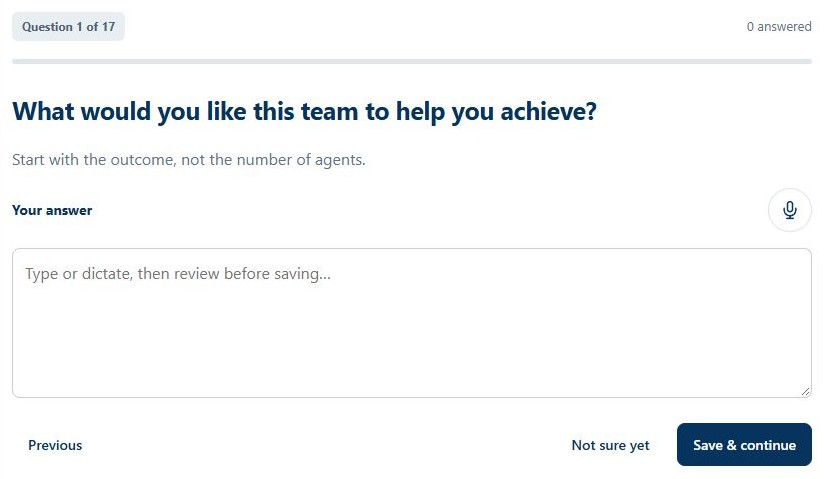
Start with a brief or answer guided questions to define what your team should achieve. Save your answers as you go.
 View screenshot
Compare each agent’s role and purpose, then open View profile to inspect their working style, skills and boundaries.
 View screenshot
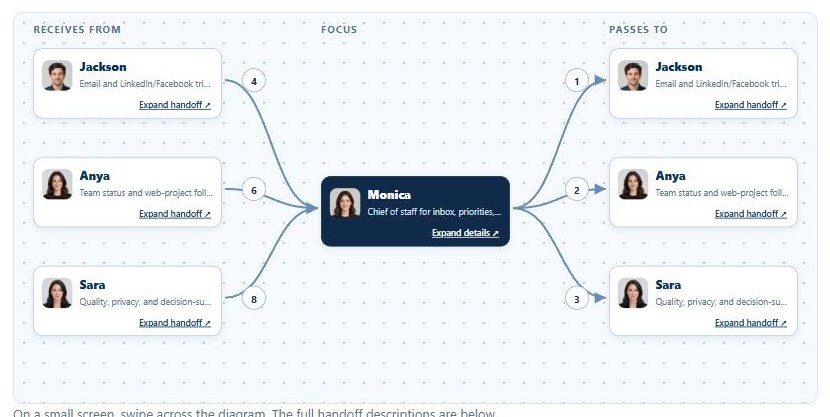
Select a teammate to explore their connections. Expand a handoff to see its trigger and what the next agent receives.
 View screenshot
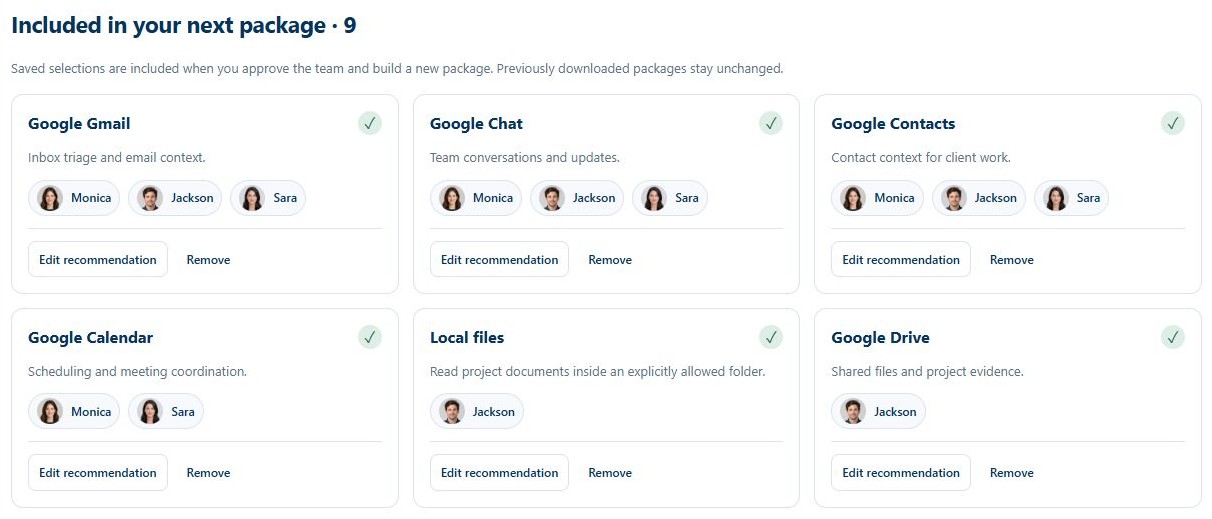
Choose the apps each agent will need and include those choices in your team package. Access is checked during setup in Hermes.
 View screenshot
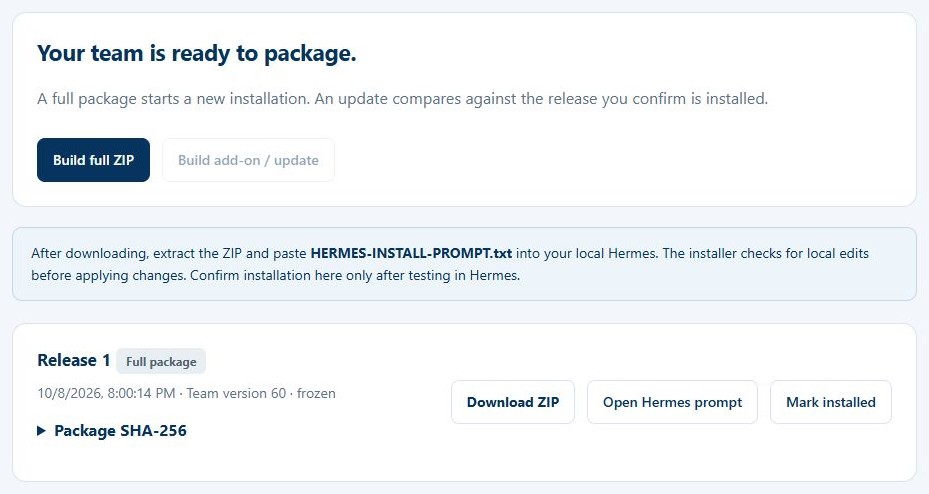
Build an approved package, download the ZIP and open its Hermes prompt. Mark the release installed only after testing it in Hermes.
Real screens from AgenticM8. Your team and approval states will reflect your own workspace.
FROM A FIRST IDEA TO YOUR OWN AI TEAM
Define the roles, shape their skills and build a workflow around your goal.
CREATIVE FREEDOM. CLEAR BOUNDARIES.
Manage user access, AI models and usage limits in one place.
Get to know AgenticM8Invite people to your workspace and protect sign-in with an authenticator app.
Administrators configure supported cloud providers and select models for each generation task.
Set limits for AI generation, team numbers and agent numbers in each workspace.
PLANS & PRICING
Choose your capacity. Build your teams. Stay in control.
One focused team, built around your goals.
for the first 12 months
Then A$200/year maintenance
Specialist teams for more of your business.
for the first 12 months
Then A$400/year maintenance
More teams. Greater capacity. Your control.
for the first 12 months
Then A$600/year maintenance
All prices in Australian dollars. Annual maintenance starts from year two.
Online checkout is not yet available.
A FEW THINGS WORTH KNOWING
AgenticM8 is a studio for designing, refining and packaging AI agent teams. It guides you from a business brief to agents with defined roles, profiles, skills and handoffs, then lets you approve and export the team.
No. AgenticM8 helps you design, preview and package your team. Your agents run in Hermes, where you install the package and connect their tools. Previews in AgenticM8 show how agents respond without using external tools.
Yes. Edit agent names, profiles, character, skills and handoffs. Give feedback to refine the design, approve individual agents and keep revisions as your team evolves.
A downloadable ZIP containing your agent profiles, skills, shared team instructions, a guide, a package manifest and installation instructions for Hermes. Export a full package for your first installation, or an update package for later changes.
Accounts are created by invitation. If you already have an account, open the app to sign in. For a new account, ask your AgenticM8 administrator for an invitation.
Your administrator configures the cloud provider credentials and generation models for the workspace. Provider usage is separate from the team package, and access depends on the configured allowances.

YOUR GOALS. YOUR PEOPLE. YOUR AI TEAM.
Give it a team designed around you.
Open AgenticM8Have an account? Sign in to start building your team. Your goals, understood.


